
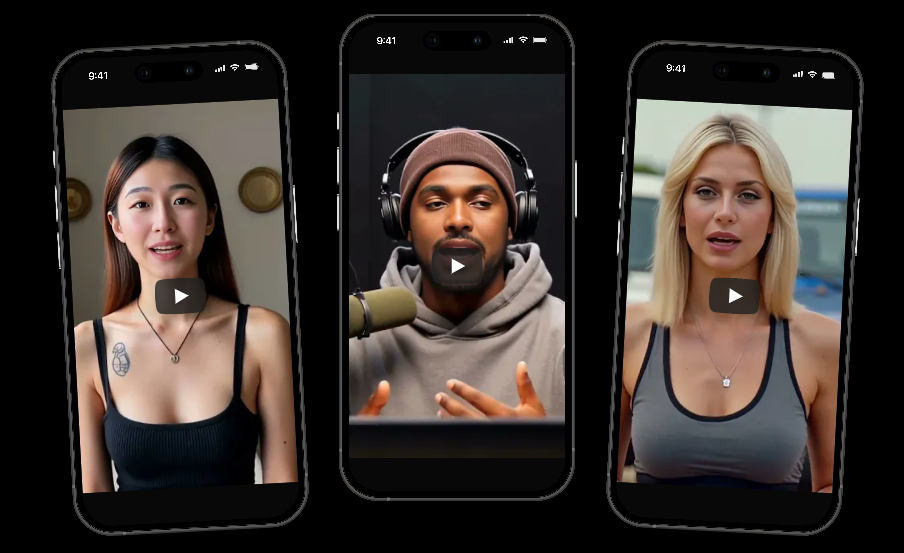
Video content has become one of the most effective ways to communicate ideas, promote products, educate audiences, and share stories online. However, traditional video production often requires significant time, technical skills, and editing experience. This is where a text to video AI generator becomes valuable. These tools can transform written prompts into engaging video content within minutes, helping creators, marketers, educators, and businesses produce visual content more efficiently.
As artificial intelligence continues to improve, video generation tools are becoming more capable of creating realistic scenes, animations, voiceovers, and visual effects. Consequently, more people are turning to AI-powered solutions to simplify their content creation process while maintaining quality and creativity.
This article covers how these tools work, how to create videos from text prompts, best practices for achieving better results, common use cases, key benefits, limitations, and future developments.
Why AI Video Creation Is Becoming Popular
The demand for video content continues to grow across social media, websites, online learning platforms, and digital marketing campaigns. Creating professional videos manually often requires scripting, filming, editing, and post-production work.
AI video technology helps reduce these challenges by converting written descriptions into visual content. As a result, individuals and businesses can produce content faster while reducing production costs.
Several factors contribute to the growing popularity of AI-generated videos:
- Faster content production
- Reduced editing requirements
- Lower production expenses
- Easy accessibility for beginners
- Support for multiple content formats
- Improved creative experimentation
Consequently, AI-generated videos are becoming a practical option for creators with different experience levels.
How a Text Prompt Becomes a Video
A text to video AI generator uses machine learning models trained on large datasets containing images, videos, animations, audio, and language patterns.
The process generally follows these stages:
1. Prompt Analysis
The AI reads the written prompt and identifies important elements:
- Characters
- Objects
- Actions
- Background settings
- Emotions
- Camera movements
2. Scene Construction
The system generates scenes that match the prompt. It attempts to create visual consistency throughout the video sequence.
3. Motion Generation
Static visuals are converted into moving scenes. Characters, objects, and environmental elements receive animation based on the prompt.
4. Audio Integration
Some tools can automatically add:
- Narration
- Background music
- Sound effects
- Voiceovers
5. Video Rendering
The final sequence is processed and exported into a video format suitable for publishing.
Simple Steps to Create AI Videos
Many platforms follow a similar workflow. Users generally need only a few steps to generate content.
Choose a Suitable Platform
Different AI video tools focus on different content styles. Some are designed for marketing videos, while others specialize in cinematic storytelling or animated content.
Before selecting a platform, consider:
- Video quality
- Rendering speed
- Editing options
- Voice generation capabilities
- Export formats
- Pricing structure
Write a Clear Prompt
The quality of the result often depends on prompt quality.
A weak prompt:
«A person walking.»
A stronger prompt:
«A young traveler walking through a colorful market at sunset, cinematic lighting, smooth camera movement, realistic style.»
Specific details help the AI create more accurate scenes.
Select Visual Preferences
Many tools allow users to choose:
- Animation style
- Realistic visuals
- Camera angles
- Aspect ratios
- Video duration
These settings help align the output with the intended purpose.
Generate and Review
After submitting the prompt, the system generates the video.
The first result may not always be perfect. Consequently, revisions and prompt adjustments often improve quality.
Edit and Export
Most platforms provide editing features for:
- Scene adjustments
- Text overlays
- Voice synchronization
- Music selection
- Branding elements
Once satisfied, users can export the final video.
Prompt Writing Tips for Better Results
Prompt quality directly influences video quality.
Include Visual Details
Describe:
- Environment
- Lighting
- Weather
- Character appearance
- Actions
For example:
«A futuristic city at night with glowing skyscrapers, flying vehicles, and soft neon reflections on wet streets.»
Mention Camera Movements
Helpful camera instructions include:
- Close-up shot
- Wide-angle view
- Slow zoom
- Drone perspective
- Tracking shot
These details improve cinematic presentation.
Define Style
Specify whether the video should appear:
- Realistic
- Animated
- Cartoon-inspired
- Sci-fi themed
- Fantasy based
Clear style instructions help the AI remain consistent.
Keep Instructions Organized
Long prompts can become confusing.
Instead, separate ideas logically:
- Subject
- Environment
- Action
- Visual style
- Camera movement
This structure often produces better outputs.
Popular Uses for AI Video Generation
AI-generated videos are now being used across many industries.
Digital Marketing
Businesses create:
- Product demonstrations
- Promotional videos
- Social media advertisements
- Brand storytelling content
Consequently, marketing teams can produce campaigns more efficiently.
Education and Training
Educational organizations use AI videos for:
- Tutorials
- Explanations
- Online courses
- Employee training
Visual learning often improves information retention.
Content Creation
Creators generate:
- Short-form videos
- YouTube content
- Storytelling projects
- Animation concepts
Likewise, independent creators can produce videos without expensive equipment.
Business Presentations
Companies use AI-generated videos to communicate:
- Product launches
- Internal updates
- Investor presentations
- Customer onboarding materials
Professional-looking visuals can improve engagement.
Research Statistics on AI Video Adoption
Recent industry reports indicate continued growth in AI-powered content creation.
| Category | Estimated Growth Trend |
|---|---|
| AI Content Creation Market | Strong annual growth |
| Video Marketing Adoption | Increasing globally |
| AI-Assisted Video Production | Rising across industries |
| Educational Video Usage | Expanding steadily |
| Social Media Video Demand | Continues to increase |
AI Video Workflow Overview
| Stage | Purpose |
|---|---|
| Prompt Creation | Define video concept |
| AI Processing | Analyze instructions |
| Scene Generation | Build visual sequences |
| Motion Rendering | Create movement |
| Audio Addition | Add narration and sound |
| Final Export | Produce completed video |
The growing demand for visual content suggests that AI video generation will remain an important part of digital communication strategies.
Common Mistakes That Affect Video Quality
Many beginners experience inconsistent results because of avoidable mistakes.
Writing Vague Prompts
Unclear instructions make it difficult for the AI to generate accurate scenes.
Adding Too Many Ideas
A single prompt containing numerous unrelated concepts can reduce consistency.
Ignoring Revisions
AI-generated content often improves after multiple iterations.
Skipping Editing
Even strong AI outputs benefit from human review and refinement.
Consequently, combining AI assistance with editing usually produces stronger results.
Creative Applications Beyond Marketing
AI video technology is no longer limited to business content.
Creative users are producing:
- Short films
- Music visualizations
- Story-driven animations
- Fantasy scenes
- Historical recreations
Meanwhile, communities interested in storytelling often combine AI-generated visuals with AI roleplay chat experiences to build interactive narratives and fictional worlds.
These creative possibilities continue expanding as generation models improve.
Choosing the Right AI Video Tool
The market now offers many options with different strengths.
When comparing tools, evaluate:
- Ease of use
- Video realism
- Rendering speed
- Editing flexibility
- Audio quality
- Commercial licensing
Some creators also compare specialized solutions for animation projects. In certain creative communities, interest occasionally extends to niche tools such as a hentai AI video generator, although most business and educational users focus on general-purpose video creation platforms.
Selecting the right tool depends on the intended audience and project goals.
How AI Video Technology May Change in the Future
AI video generation continues advancing quickly.
Future improvements may include:
- Longer video sequences
- More realistic character motion
- Better facial expressions
- Improved voice synchronization
- Advanced scene consistency
- Real-time video generation
Consequently, content creators may gain even greater control over production quality while reducing manual effort.
Companies developing AI communication tools, including brands like Secrets AI, continue contributing to broader innovation across artificial intelligence applications. Likewise, growing investment in AI research is expected to accelerate improvements throughout the industry.
Combining AI Video Creation With Other Content Strategies
Many creators combine video generation with:
- Blog articles
- Podcasts
- Social media campaigns
- Email marketing
- Educational resources
In the same way, businesses can repurpose written content into videos, extending the value of existing material.
A well-written article can become a video script, while a video can later be transformed into social media clips and promotional materials. Consequently, content production becomes more efficient and scalable.
Some creators also use a text to video AI generator alongside chatbot technologies from companies such as Secrets AI to create richer multimedia experiences for audiences.
Getting Better Results Over Time
Successful creators typically improve through experimentation.
Helpful practices include:
- Testing different prompt styles
- Reviewing successful outputs
- Saving effective prompt templates
- Refining camera instructions
- Improving scene descriptions
Eventually, prompt-writing skills become an important part of the creative process.
As a result, users gain greater control over the videos generated by a text to video AI generator and can consistently produce higher-quality content.
Conclusion
AI-powered video creation is changing how content is produced across marketing, education, business communication, and entertainment. A text to video AI generator allows users to transform written ideas into engaging visual content without requiring advanced editing expertise. Although results may vary depending on prompt quality and platform capabilities, continuous improvements in artificial intelligence are making video generation more accessible and effective.
Consequently, creators who learn strong prompting techniques and editing practices can use a text to video AI generator to produce compelling content efficiently while adapting to the growing demand for video-based communication.